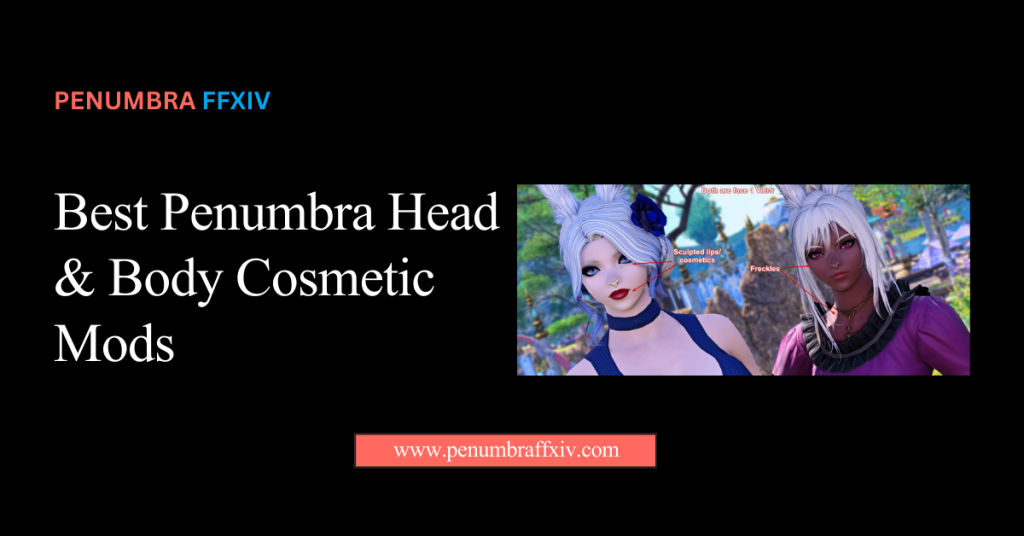
Penumbra Head & Body Cosmetic Mods That Work Best
Taking your character’s appearance from standard to spectacular is all about finding the right balance between detail and stability. While the default options in Eorzea are iconic, the world of advanced cosmetic upgrades offers a level of realism that truly makes your hero stand out.
This guide is your curated list of the most stable and stunning head and body enhancements available today. We have tested these specific picks to ensure they offer the best visual “pop” while maintaining a smooth framerate during intense raids or busy cities.
By using Penumbra FFXIV as your management hub, you can layer these high-definition skins and refined body meshes without worrying about crashing. Let’s dive into these top-tier projects and discover how you can achieve a professional, cinematic look that reflects your unique identity!
What are the Best Body Mesh and Skin Texture Mods?
Choosing a solid body base is the foundation of any good cosmetic setup because it determines how every piece of clothing fits. Modern body mods replace the old, blocky shapes with smoother lines and high-definition skin textures that look amazing.
These bases also allow for more realistic skin shading, adding depth and shadow that the standard game simply doesn’t have. When you choose a top-tier body mod, you open the door to thousands of custom outfits designed for that shape.
Comparing Popular Body Bases Like Bibo+ and The Body SE
Bibo+ is the go-to choice for feminine characters, offering a huge range of skin options and massive support for custom armor. It is famous for its smooth look and the large community of creators who make clothing for it.
For masculine characters, The Body SE (TBSE) provides a rugged and detailed look that makes your hero look like a true warrior. It adds muscle definition and realistic skin tones, making your character feel powerful and ready for battle.
Implementing High-Definition Skin Shaders for Realistic Lighting
Skin shaders change how the game’s light bounces off your character, removing the flat “plastic” look of the original files. Glamour mods with Penumbra can add subtle details like soft highlights, making your character look like they truly belong in a modern RPG.
These textures handle shadows much better, ensuring your character looks great in both bright sun and dark dungeons. It is a simple upgrade that provides a massive boost to your overall visual quality in every zone.
Comparison Table: Compatibility Between Different Body Bases
| Bibo+ | Feminine | Extremely High | Soft and Detailed |
| TBSE | Masculine | Very High | Rugged and Strong |
| Gen3 | Specialized | Moderate | Unique and Stylized |
Mastering the Face: Top Head and Facial Feature Enhancements
Your character’s face is what you see most in every cutscene, so investing in a high-quality head mod is a total game-changer. These mods sharpen your features, add realistic eyelashes, and give you access to professional-grade makeup sets.
Custom face sculpts can even change the underlying shape of your face, allowing for more unique looks. It’s the best way to ensure your hero looks unique even when standing in a crowd of other players.
Step-by-Step Points for Installing Custom Face Sculpts and Makeup
- Download a face mod that matches your specific race and gender for the best fit.
- Use the import tool to bring the new facial textures into your mod library.
- Assign a high priority to your face mod so it doesn’t get overwritten by global skins.
- Apply custom makeup textures by linking them to the correct path in the settings.
- Use the redraw command to see your new expressions and sharper features in real-time.
Upgrading Eye Textures and Eyelash Meshes for Better Expressions
Default eyes can sometimes look a bit dull, but high-definition eye textures add a realistic spark and depth to your gaze. These mods make your character’s eyes reflect the world around them, making expressions feel much more human.
Upgraded eyelash meshes remove the blocky look of standard lashes and replace them with fine, individual hairs. This small change makes your character’s face look much more polished in close-up dialogue.
Seamless Integration: Fixing Neck Seams and Texture Mismatches
A common issue with cosmetic mods is the “neck seam,” where the head and body textures don’t match perfectly. This happens when the two mods use different color settings, but it is easy to fix with the right tools.
By matching your material suffixes and using a blending mod, you can create a perfectly smooth transition from head to toe. This small technical step is what separates a messy mod setup from a truly professional character look.
Checklist for Aligning Head and Body Material Suffixes
- Ensure both your head and body mods use the same suffix, like “_b” or “_bibo.”
- Check that your skin tone color matches across both textures in the preview window.
- Use a neck seam smoother mod to blur the line where the two meshes meet.
- Verify that your lighting mod isn’t making one part of the body look too bright.
How to Use Material Overrides to Blend Different Skin Tones
Material overrides let you manually adjust the color and shine of specific body parts to match them perfectly. This is useful if you are using a head mod from one creator and a body mod from another.
By tweaking these settings in the advanced menu, you can eliminate any color gaps and create a unified look. It gives you total control over your character’s skin tone regardless of which mods you decide to mix.
Comparison Table: Performance Impact of 4K vs 2K Cosmetic Textures
| Visual Sharpness | Great (Standard Gameplay) | Amazing (For Screenshots) |
| FPS Performance | High / No Impact | Minor Drop in Crowded Areas |
| VRAM Usage | Low (Safe for all GPUs) | High (Needs 8GB+ VRAM) |
| Loading Speed | Instant | Slightly Slower |
| Best Used For | Raiding and Dungeons | Gposing and Close-ups |
Dynamic Beauty: Adding Physics to Hair and Cosmetic Accessories
Static hair can look a bit stiff, but adding physics makes your character’s look feel much more alive as you move. Cosmetic mods that include physics data allow your hair and certain accessories to bounce and sway naturally.
This movement adds weight to your character’s actions, especially during high-energy emotes or combat. It makes the game feel more dynamic and modern as your character reacts to the world’s physics.
Optimizing Bone Links for Natural Movement in Cutscenes
Physics mods rely on “bone links” to tell the game how parts of the model should move. Optimizing these links ensures that your hair or clothing flows correctly and doesn’t jerk around during dramatic cutscene moments.
Correct bone links prevent your custom assets from behaving strangely when your character sits or lies down. It keeps your appearance stable and realistic, no matter what your character is doing in the story.
Managing Cosmetic Priority to Avoid Visual Clipping
If your long hair is passing through your armor, it is usually a priority or clipping issue. You can fix this by adjusting the order of your mods to ensure the hair textures sit “above” the armor in the engine.
Keeping your cosmetic priority list organized is the best way to ensure a glitch-free experience. A clean list prevents textures from clashing and keeps your hero looking sharp and professional at all times.
Conclusion
Elevating your character’s appearance with the best head and body mods is the ultimate way to personalize your journey. By choosing stable bases and high-definition textures, you create a cinematic look that remains consistent and beautiful across every zone.
The ability to fix neck seams and add realistic physics ensures that your hero doesn’t just look good standing still, but feels alive. Remember that organization is key; keeping your material suffixes aligned will prevent the most common visual glitches.
You now have the technical roadmap to master Advanced Editing in Penumbra and build a stunning character that truly represents your unique style and flair. Take your time to experiment with different skin shaders and facial sculpts until you find the perfect version of your hero. Enjoy your new look and have fun exploring!
Frequently Asked Questions (FAQ)
Which body mod should I choose for the best compatibility?
Bibo+ for feminine characters and TBSE for masculine models are the gold standards since most creators build gear for them. Choosing these ensures that 90% of the custom outfits you find online will fit your character perfectly without any clipping.
How do I fix a visible line at my character’s neck?
This is a “neck seam” caused by using different skin textures for the head and body. To fix it, ensure both mods use the same skin pack and matching material suffixes to create a seamless transition.
Will using 4K skin textures make my game lag?
Most modern PCs handle 4K skins easily, but they do require more video memory (VRAM). If you have an older graphics card, sticking to 2K textures is a smarter way to keep your framerate high and stable.
Can I use a custom face sculpt with standard hair?
Absolutely! Custom face sculpts only modify the skin and underlying mesh of the head, leaving your hairstyle options completely open. You can mix any vanilla or modded hair with your new face for a truly unique look.
Why does my skin look green or blue in certain areas?
This is a material error that happens when the plugin cannot find the specific texture file it needs. Double-check your folder names and paths to ensure all files were extracted correctly during the import.
Do cosmetic mods work on all races?
Most cosmetic mods are designed for specific races, such as Midlanders or Miqo’te. Always read the mod description to confirm it fits your race, as a mod meant for a Lalafell will not work on a Roegadyn.
How do I make my makeup look sharper?
You need to set your “Face” mod to a higher priority than your “Body Skin” mod in the settings. This tells the engine to render the makeup details on top of the skin, preventing them from looking blurry or faded.
Is it safe to use body mods in public areas?
Yes, considering that these modifications are “client-side” and only alter the content that appears on your own screen. Your normal in-game equipment will be the only thing other players see, making your modding hobby secure and secret.
Latest Posts:
- Domain Lookup: A Complete Guide to Finding Domain Information
- How to Force Show an Accessory in Penumbra FFXIV: Fix Hidden Earrings, Necklaces, Bracelets, and Rings
- What Is Mare Synchronos? FFXIV Mod Synchronization, Privacy, and Current Status
- How to Install Eye Mods in FFXIV Penumbra: Complete Beginner Guide
- How to Install Tattoo Mods in FFXIV Penumbra: Complete Beginner Guide